
Halo closes out 2026 with a reworked AI configuration area, tighter CMDB governance, a more capable Self-Service Portal and built-in PII redaction. Here is what changed and where it can help your teams.
Version 2.250 is the last Halo release of 2026. The biggest changes are in AI, asset and CMDB management and the Self-Service Portal, with smaller but useful additions to automation, reporting and integrations along the way.
.png?width=564&height=318&name=6ab141119bf08b8560c612f7_Halo%20New%20Features%20Thumbnails%20(2).png)
AI and agents
AI settings have been reorganised so they are easier to find, and the platform now removes some manual setup when you build agents.
| Built-in OpenSearch for hosted customers | Hosted customers can now choose a built-in OpenSearch option in the AI configuration. Vectors are stored in Halo's own OpenSearch instance, so there is no connection to set up. Unlike the earlier Halo Vector Store, it can index knowledge base articles and services as well as tickets. |
| AI configuration split into five modules |
The AI area is now divided into dedicated sections:
The former "AI Agent" entity is now called a Process Agent. "AI Agent" becomes the umbrella term for Virtual, Operations and Process Agents. |
| Download run books from the online repository | Run books that contain Process Agents and AI Abilities can be pulled straight from the online repository. The agents and abilities they rely on are added to your instance automatically. |
| Application records created for you | Creating a Process Agent now generates its Application record automatically. Permissions follow the functions you choose. For example, adding "Get One Ticket" grants read access to tickets. You can still add further permissions by hand. |
| Other Uses tab | Virtual Agents, Operations Agents, Process Agents and AI Abilities each gain a tab showing which chat profiles or runbooks use them, which makes it easier to see the impact of a change. |
 CMDB and assets
More control over where CMDB data comes from, plus actions, workflows and lookups on configuration items and assets.
| Reconciliation and integration precedence | A new Reconciliation area lets administrators rank their asset and CMDB integrations. When a higher-ranked integration has set a field, lower-ranked ones can no longer overwrite it. Ranking can be set globally or adjusted field by field. |
| Notes on CI relationships | Notes can be added when creating or editing a relationship between configuration items. They show in the relationship table and appear on hover in the relationship diagram. |
| Link a CI to a service | Change a configuration item to a type classed as a service or business application and Halo prompts you to link it to an existing service or create a new one. When linking to an existing service, shared properties such as name, business owner and note take the CI's values. |
| CI-based problem matching | The resolution finder can now use Knowledge Base articles linked to a configuration item as a matching criterion. This improves suggested resolutions where CIs sit at the centre of your service automation. |
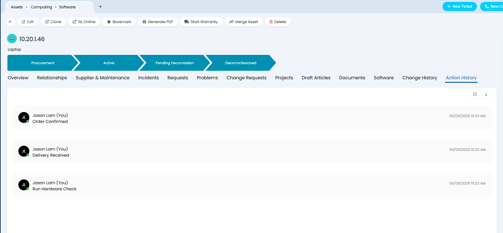
| Action forms on CIs | Custom buttons on a CI can open an action form to capture structured data against it. Forms can include CI and service fields, custom fields and a note, and field visibility follows the CI's own settings. A default status can be applied after the action. Every completed action is logged in an Action History tab with the agent, date, button, new status and note. Other field changes appear in the CI's change history. |
| CI workflows | Those buttons can be built into CI workflows, with conditional steps to control when a button appears and automations that queue runbooks. A CI type can start a workflow automatically and show its progress. Current progress is shown on the CI above the tabs and can be changed from there. |
| Asset lookups | Asset fields and custom fields can now fill themselves in based on the values of other fields. Lookups are triggered by system, asset or custom fields and run whenever an asset is updated. |
| Book several assets at once | Resource booking now supports reserving multiple assets in one booking, with the maximum set per booking type. If asset selection is off, only slots with enough availability are offered and the full quantity is allocated automatically. If it is on, a minimum-availability setting controls which slots appear and users choose up to the maximum. |
Self-Service Portal
The portal gets new ways to find answers, keep work in progress and see service health, so end users can do more without raising a ticket.
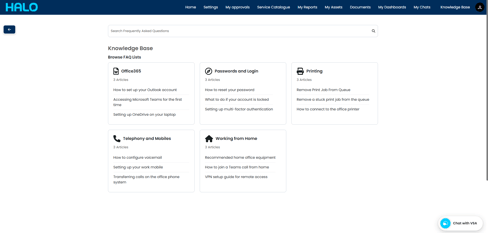
| Knowledge Base Tiles | A new display type shows FAQ Lists as tiles beside a search bar. Each tile can have its own icon and up to three quick-access articles. Opening a tile reveals its child lists and articles, with breadcrumb navigation. The root FAQ List can be restricted per button. The home screen search bar can also use the tile view's search, and "Top 5 Articles" now opens straight into it. |
| Saved ticket drafts | With drafts enabled on a ticket type, saving on the portal quietly creates a ticket at a nominated draft status. Agents can see these in the agent application and users can find theirs under a new "My Drafts" button. Acknowledgement emails, SLA timers, rule matching and child ticket creation all wait until the ticket is properly submitted. |
| Full-page chat | Chat can be added as a menu button that opens as a full page rather than a small bubble. It shows the most recently closed chat and gives users a larger window to start a new one. |
| Carousel widget | A new widget cycles through multiple slides. You set the order and display time for each slide, and users can move between slides manually. |
| Dashboards on portal tickets | Column profiles for portal tickets can be shown as dashboards, with all agent application widgets supported. Custom dashboard tabs on tickets can be shown to agents, users or both, so you decide what end users see. |
| Service status widget | Service statuses can now appear as a widget for agents and users. On a ticket dashboard it shows the status of services linked to that ticket. The same options for choosing which statuses to show are available per widget. |
Automation and events
Smaller changes that add up to cleaner processes, better routing and more precise reporting.
| To-do lists that reach users | To-do items can carry an optional link, handy for pointing people to a form, document or resource as part of a process. A new "User To-Do List Completion" setting lets users tick off their own items. Choose Not Allowed, Always Allowed or "Can specify per to-do item". Settings on groups and templates carry through to tickets, and a ticket-level choice of Always or Not Allowed overrides the template. When a user completes a list or group, matching workflow actions can fire. |
| Global run book variables | Frequently used values can now be stored once and used in any run book. Updating a global variable changes it everywhere it is referenced. Global variables are config tracked and can be synchronised between instances. |
| SharePoint in custom integrations | SharePoint connections that use the authorisation code method can now be used in custom integrations, opening up more ways to move SharePoint data in and out of Halo workflows. |
| CI relationship change triggers | Relationship changes are now part of the "Configuration Item Updated" event, so notifications and automations can respond when a CI's relationships change. |
| Event management improvements |
|
| Criteria groups for ticket areas | Ticket Areas now support criteria groups, giving administrators finer control over which tickets appear in each area by combining conditions. |
| Follower notifications | A new Follower notification type adds Follower Added and Follower Removed triggers, so notifications or automations can run when someone starts or stops following a ticket. |
| Teams and Slack message alerts | A new "Chat Message Received" notification tells agents when a message arrives on a ticket through Microsoft Teams or Slack. |
| SLA breach dates for reporting | An option on each ticket type stores the date an SLA is breached, with separate columns for response and resolution breaches in the FaultsMetrics table. The data can be queried with SQL or returned through the API using the includemetrics parameter. |
Privacy
Halo can now flag and redact personal information in tickets and chats.
| Automatic PII detection and redactionNew | Switch it on under Configuration > Users > General Settings, where you can also set automations to scan on chosen events and ticket types. A shield icon on a ticket shows the number of active detections, with a manual scan available on hover. Flagged items can be reviewed one by one or selected in bulk to redact or dismiss. Redacted data is replaced with the type of data found. Redaction is permanent and cannot be undone. |
| Privacy Centre | A new navigation module lists every ticket with active PII detections and keeps an audit log of redact and ignore actions. Scanning covers ticket details, action notes, email bodies and chat messages, including their HTML versions. |
Integrations
One improved integration and two new ones.
| Zoom app for agents | A new Halo app can be installed in Zoom, installed by signing in from within Halo. It adds two things:
|
| AWS Bedrock | A new integration with Amazon's generative AI service. |
| Juniper Mist | A new integration with Juniper's Mist platform. |